Skills and Skill Groups
Skills give Sable reusable, organization-specific operating guidance. Combine related skills into a Skill Group, then attach that group to a new or scheduled assessment instead of repeating the same instructions in every scope.
This feature is available to eligible accounts.
Skill or methodology?
| Use | Best for |
|---|---|
| Skill | A focused procedure, technique, tool preference, or operating rule that can be reused across assessment types |
| Skill Group | A selectable collection of related skills for a particular kind of engagement |
| Methodology | The overall testing approach and starter tasks for an assessment |
| Scope | Target-specific authorization, credentials, limits, and out-of-scope systems |
For example, a web application skill group could combine separate skills for SSRF identification, authenticated testing, and API enumeration while the methodology defines the assessment’s overall sequence.
Create a skill
- Open the Skills manager from the assessment configuration flow.
- Select the Skills tab.
- Click +.
- Give the skill a clear name.
- Write the procedure or guidance Sable should follow.
- Save the skill.
Keep each skill focused. Include decision criteria, preferred tools, required evidence, and safety boundaries when they apply.
Create a skill group
- Open the Skill Groups tab.
- Click +.
- Enter a name and description.
- Select the skills to include.
- Save the group.
Updating a skill changes the reusable guidance for future assessments that use it. Review shared skills before editing them so you do not unintentionally change another team’s workflow.
Use skills in an assessment
- Create a new assessment.
- Choose the methodology and scope.
- Under Skill Group, choose Off, All Skills, or a named group.
- Review the included skills and start the assessment.
This selection controls which account skills Sable may read during that pentest. Click Manage if you need to create or update a Skill Group before starting.
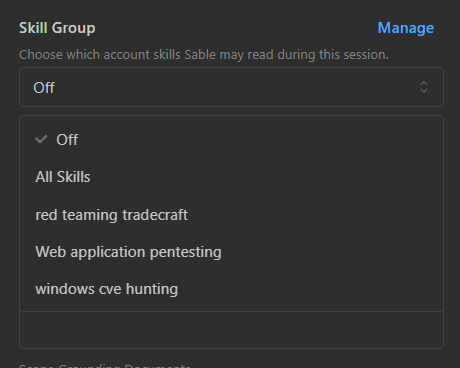
Sable reads the selected skills during the assessment and records that activity in the event log.
Skill groups can also be saved in a scheduled-pentest template, which keeps recurring assessments consistent.
Next
- Define the overall workflow: Methodologies
- Reuse the configuration on a schedule: Scheduled Pentests
- Redirect one active task: Controlling Sable